
Today we released version 3.0.0. We fixed several bugs in the new layout and migrated some features from the old to the new layout (e.g. you can edit the tags of your posts in the post list again). Furthermore, we improved several web scrapers and added a new scraper for Akadémiai. We also fixed some minor bugs in the core system to provide a better user experience and system performance.
We are happy to announce that all BibSonomy modules are now open source. You can find the source code on Bitbucket. Moreover, you can find all compiled modules in our Maven repository (http://dev.bibsonomy.org/maven2) including a source distribution.
Happy tagging,
Daniel
Showing posts with label scraper. Show all posts
Showing posts with label scraper. Show all posts
Wednesday, November 26, 2014
Thursday, June 5, 2014
Feature of the Week: Bookmarking publications from Morgan and Claypool Publishers with the BibSonomy add-on
This week's feature is presented by our student Haile:
The new MorgenClaypoolScraper scrapes publication metadata from Morgan & Claypool Publishers and thereby allows you to easily store that data in BibSonomy. Using the scraper is very easy with the BibSonomy add-on. If you do not have it in your browser, yet, download and install it for your browser. Here are the basic steps to follow when you want to post publications using the add-on:
The new MorgenClaypoolScraper scrapes publication metadata from Morgan & Claypool Publishers and thereby allows you to easily store that data in BibSonomy. Using the scraper is very easy with the BibSonomy add-on. If you do not have it in your browser, yet, download and install it for your browser. Here are the basic steps to follow when you want to post publications using the add-on:
- Open a publication from Morgan & Claypool publishers. For example, Linked Data: Evolving the Web into a Global Data Space is available on their website.
- Click on the save publication button on your browser:
- A new page will be loaded for editing your entry. Add tags by extending tags (encircled in red). Possible tags will be recommended by BibSonomy.
- Click on the save button.

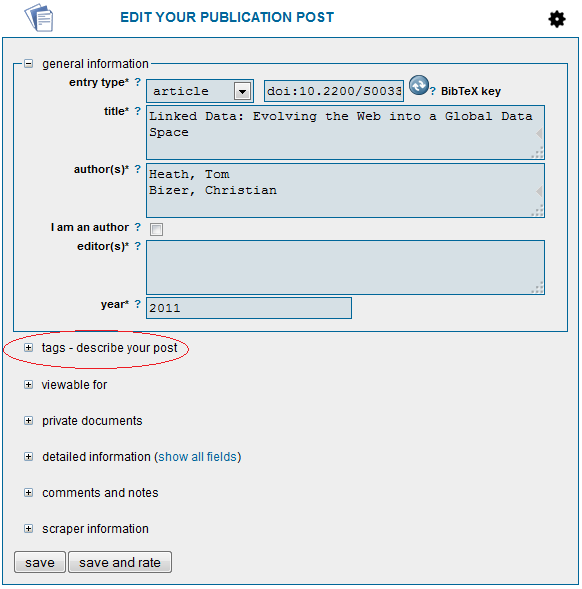
As you can see, it’s very easy: on the publication site from Morgan & Claypool you just need to click on the post publication button of the BibSonomy browser add-on.
Happy Tagging!
Haile M

Wednesday, November 16, 2011
Feature of the week: Add new publications by ISBN
This week we present a small but - we think - nice feature and we hope it will save you a lot of time. While searching for interesting and new papers the boring part is often to collect all meta data for storing the new entry. We try to make this part as easy as possible and several earlier blog posts describe the bookmarklet or the underlying scraping service which extracts important information for you. If you do not have the necessary bookmarklet, you have to add it to your browser. The scraping service can also be utilized to add a publication identified just by its ISBN or DOI.
There are two ways to do this: The first way is directly via our web service. You start by clicking post publication in the menu and select the ISBN/DOI add dialog which looks like this:
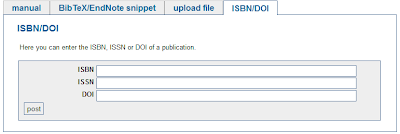
Then you enter your ISBN or DOI and all the information is gathered for you and your are done by entering some keywords (tags) to describe the content. Try it e. g. with the following ISBN: 978-3898383325.
The other way is more common. Imagine, you were searching the web for something new and found a book you would like to remember. Unfortunately, the book you found was on one of the pages that we do not offer a scraper for. But on the page is an ISBN like on the publisher page of Robert's dissertation. Just highlight the ISBN and use your bookmarklet and all data will be collected. Before you press the button, your browser should look like this:
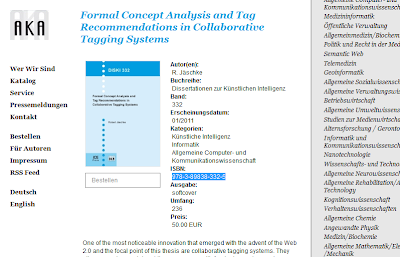
So, that's all for today and I hope this best practices helps you to save time and collect a lot of references for your work.
Happy tagging
Andreas
There are two ways to do this: The first way is directly via our web service. You start by clicking post publication in the menu and select the ISBN/DOI add dialog which looks like this:

Then you enter your ISBN or DOI and all the information is gathered for you and your are done by entering some keywords (tags) to describe the content. Try it e. g. with the following ISBN: 978-3898383325.
The other way is more common. Imagine, you were searching the web for something new and found a book you would like to remember. Unfortunately, the book you found was on one of the pages that we do not offer a scraper for. But on the page is an ISBN like on the publisher page of Robert's dissertation. Just highlight the ISBN and use your bookmarklet and all data will be collected. Before you press the button, your browser should look like this:

So, that's all for today and I hope this best practices helps you to save time and collect a lot of references for your work.
Happy tagging
Andreas
Tuesday, October 12, 2010
Feature of the week: New supported sites for posting publications
As you may already know, you can post publications manually by entering the data yourself, you can copy posts while browsing the portal, you can use the post publication button or even the firefox plugin.
For those of you, who are interested in the technical details, i want to describe in the following section, what happens in the background. For the others the information, that we now support the Astronomy & Astrophysics site, might be sufficient.
So now for the details. As i already explained, we support a certain list of websites, where the listed publications can easily be scraped by using the buttons or firefox plugin mentioned above. For a complete list have a look here. The process of scraping can be explained as an automated process, that grasps the structure of a website and the data that is contained and uses this knowledge to extract the wanted information in a standardized way. Also see the BibSonomy help for more details.
So, as you can see, we steadily work on expanding our functionality in order to make the use of BibSonomy as comfortable as possible.
For those of you, who are interested in the technical details, i want to describe in the following section, what happens in the background. For the others the information, that we now support the Astronomy & Astrophysics site, might be sufficient.
So now for the details. As i already explained, we support a certain list of websites, where the listed publications can easily be scraped by using the buttons or firefox plugin mentioned above. For a complete list have a look here. The process of scraping can be explained as an automated process, that grasps the structure of a website and the data that is contained and uses this knowledge to extract the wanted information in a standardized way. Also see the BibSonomy help for more details.
So, as you can see, we steadily work on expanding our functionality in order to make the use of BibSonomy as comfortable as possible.
Friday, March 27, 2009
FOW: You better save this as publication...
Since Andreas' blog post you already know BibSonomy's scraping service which enables BibSonomy to automatically extract publication meta data from some websites.
For some time past this service also checks whether a user posts a bookmark pointing to a scrapable site, in which case the user is given an according hint:
 We now extended this feature such that text, selected by the user prior hitting the 'postBookmark' button, is also checked. Thus, if you select BibTeX and press "postBookmark" or a DOI it might happen, that you get a notice, that you better save this as publication and not as bookmark.
You might try it out yourself right now by selecting one of these text snippets and pressing "postBookmark":
For some time past this service also checks whether a user posts a bookmark pointing to a scrapable site, in which case the user is given an according hint:
 We now extended this feature such that text, selected by the user prior hitting the 'postBookmark' button, is also checked. Thus, if you select BibTeX and press "postBookmark" or a DOI it might happen, that you get a notice, that you better save this as publication and not as bookmark.
 You might try it out yourself right now by selecting one of these text snippets and pressing "postBookmark":
- 10.1007/978-3-540-73681-3_21
- ISBN-13: 978-0201485417
Tuesday, November 11, 2008
Metadata Scraping Service
As mentioned in Robert's last blog post we set up a scraping service which supports users working with citations by extracting automatically references from digital library or publisher websites. We use a very similar service in BibSonomy to support our users while posting a new reference. However, the service is independent from BibSonomy. Our main goal is to make the metadata of other websites easily accessible to every user who needs bibliographic metadata. Therefore we offer the extracted information in BibTeX format. Most tools allow to import BibTeX so it should be very easy for everyone to get the data into his own tool. The service is running under the following URL:
http://scraper.bibsonomy.org/
Currently we support more than 60 different websites (here the full list) and we are working on further extensions. In the near future we will make the source code of our scrapers publicly available under GPL and we hope that other people will find it useful and start to help us by implementing their own scrapers.
How does the service work?
In principle there are two ways to use the service. One uses a so
called bookmarklet and the other is simply based on the URL. If you
have a webpage of a supported site e.g. from ACM digital library the
following page:
Logsonomy - social information retrieval with logdata
then you can copy this URL into the form on the service homepage and the service will return you the extracted BibTeX information. As this is not a very convenient way to access the data we provide a ScrapePublication button. This button is a small piece of JavaScript and can be copied to the toolbar of the browser. By pressing this button while visiting a digital library webpage the URL will be automatically copied and sent to the scraping service and the metadata is extracted.
The service has three options which can be used to customize it and to make it useful for other systems. Obviously one parameter is the URL itself which is used by the bookmarklet, too. The next is the selection parameter which allows to send text to the service and the last parameter allows to change the output format from html to plain BibTeX. This last parameter makes integration with other systems very simple.
If needed we can provide the metadata in other formats as well but currently we support only BibTeX.
http://scraper.bibsonomy.org/
Currently we support more than 60 different websites (here the full list) and we are working on further extensions. In the near future we will make the source code of our scrapers publicly available under GPL and we hope that other people will find it useful and start to help us by implementing their own scrapers.
How does the service work?
In principle there are two ways to use the service. One uses a so
called bookmarklet and the other is simply based on the URL. If you
have a webpage of a supported site e.g. from ACM digital library the
following page:
Logsonomy - social information retrieval with logdata
then you can copy this URL into the form on the service homepage and the service will return you the extracted BibTeX information. As this is not a very convenient way to access the data we provide a ScrapePublication button. This button is a small piece of JavaScript and can be copied to the toolbar of the browser. By pressing this button while visiting a digital library webpage the URL will be automatically copied and sent to the scraping service and the metadata is extracted.
The service has three options which can be used to customize it and to make it useful for other systems. Obviously one parameter is the URL itself which is used by the bookmarklet, too. The next is the selection parameter which allows to send text to the service and the last parameter allows to change the output format from html to plain BibTeX. This last parameter makes integration with other systems very simple.
If needed we can provide the metadata in other formats as well but currently we support only BibTeX.
Thursday, July 26, 2007
Feature of the Week: Automatic Detection of Scrapeable Content
Sometimes when you surf ACM, Springer or similar sites, you inadvertently punch the “postBookmark” instead of the “postPublication” button when you really want to post a publication.
BibSonomy now automatically detects if you are on a site it has a screen scraper for, and offers the possibility to choose whether you want a bookmark or publication post.
BibSonomy now automatically detects if you are on a site it has a screen scraper for, and offers the possibility to choose whether you want a bookmark or publication post.
Friday, April 27, 2007
Feature of the Week: Information Extraction supports the Import of References from Homepages
Todays feature of the week post will point you to one of the hidden features of the system. As most of you certainly know one way to acquire the meta data of a publication is to use the screen scraping facility of BibSonomy. A list of supported sites can be found here and is extended constantly. Today we released a new scraper for Highwire and LibraryThing. It's also possible to write your own extension. A description of the internal scraper interface is provided here and allows you to implement scrapers for BibSonomy.
At the end of the list you find the IEScraper which is not designed for a special web page but rather supports you in general by the import of "usual" formated publication metadata like the following one:
which you can find at:
http://www.bibsonomy.org/bibtex/29488117bf156fe15b2fb3b8ab4376dec/hotho
Unfortunately the information extraction technology is not able to process all entries correctly. For the following entry:
We hope that this feature supports everybody who finds references not at the common digital archives but rather at homepages of researchers. As the IEScraper is not perfect it takes over a reasonable amount of the work and we hope you find this feature useful.
Have fun!
Andreas
At the end of the list you find the IEScraper which is not designed for a special web page but rather supports you in general by the import of "usual" formated publication metadata like the following one:
Emma Tonkin and Marieke Guy. Folksonomies: Tidying Up Tags? . D-Lib,volume 12(1), January 2006.
http://www.cs.bris.ac.uk/Publications/pub_info.jsp?id=2000478To use this scraper you have to highlight the text of the reference you like to copy and then press the post_publication button. What happens in the backgroud is: The marked reference is send to the BibSonomy server and as no other scraper is able to process this kind of entry the IEScraper processes the entry and tries to find the different parts of the reference like: author, title, or year. You end up in the publication input mask where you find a prefilled form containing all information the scraper was able to extract. Now you can add your tags and adapt the entry. As an example the above entry in BibSonomy:
http://www.bibsonomy.org/bibtex/29488117bf156fe15b2fb3b8ab4376dec/hotho
Unfortunately the information extraction technology is not able to process all entries correctly. For the following entry:
Philipp Cimiano, Andreas Hotho, Steffen Staab. Comparing conceptual, partitional and agglomerative clustering for learning taxonomies from text. Proceedings of the European Conference on Artificial Intelligence (ECAI'04). 2004.title and authors are extracted correctly but the booktitle is wrong. It contains the missing year, too. You have to correct this mistake manually. We are logging this correction and using this kind of information to tune the IEScraper. Currently we have to start the training process manually but we are working on an automatic learning setup.
We hope that this feature supports everybody who finds references not at the common digital archives but rather at homepages of researchers. As the IEScraper is not perfect it takes over a reasonable amount of the work and we hope you find this feature useful.
Have fun!
Andreas
Subscribe to:
Comments (Atom)
Popular Posts
-
 A while ago we were asked on Twitter about a Twitter integration for BibSonomy (by the way follow @BibSonomyCrew on Twitter for the latest ...
 -
Two important aspects of working with literature are the process of sharing it among your colleagues and the exchange of ideas and thoughts ...
-
Dear BibSonomy users, right in time for Christmas / Holidays we finished our work on BibSonomy Version 3.9....
-
Dear BibSonomy users, again right in time for Christmas / Holidays we finished our - extensive - work on BibSonomy Version 4.1.0 and release...

