Showing posts with label publication. Show all posts

Thursday, February 13, 2014

Feature of the week: Tidy publication page

We've proud to present you the new publication page. The aim of the redesign was to create a tidy and easily accessible page, which presents the important information of a publication, its authors, and the user who saved the post.

Ok, let's have a look at the new page.
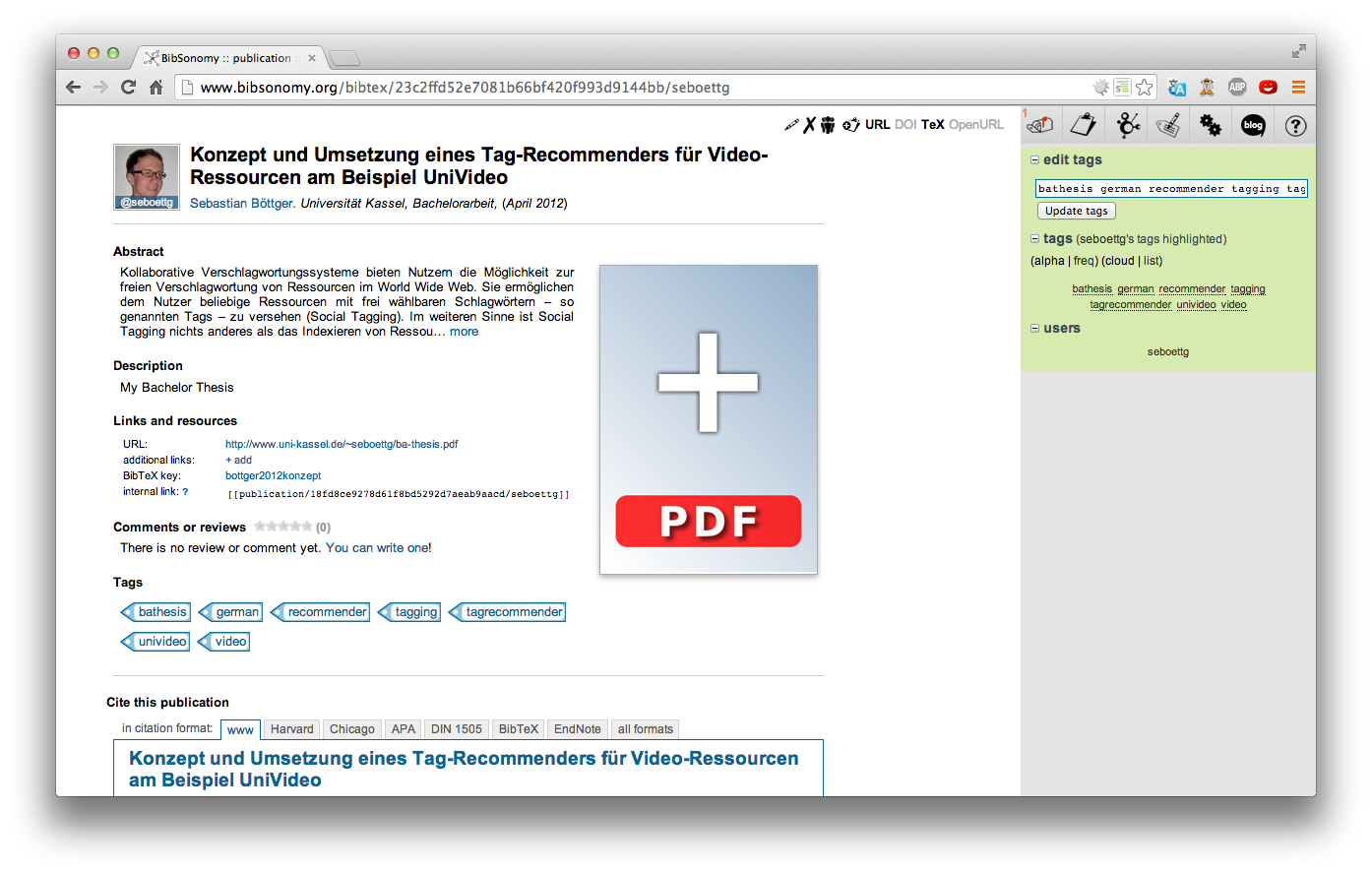
Tidy publication page

At the head of our new publication page you can find the title, authors, and other important information depending on the type of the publication next to the thumbnail of the post owner's profile picture.

If there is an abstract and/or a description, it is shown next, followed by Links and resources section where you can find the links and the BibTeX key.

The following section shows user comments and ratings (if anyone has reviewed or rated this publication), followed by a general view of the owner's tags of this post.

At the bottom of the page there is the familiar citation box.

Easily managing documents of a publication

One of the important modifications is the way of managing your private documents. If the post is your own, you find a placeholder image with a big plus at the right side of the content area. You can click on it to upload associated files, for instance the whole publication or several parts like indexes or charts.

For every uploaded document BibSonomy creates  a preview of the document's first page (supported for almost every file type). The latest uploaded document is shown first. If you have uploaded more than one document, BibSonomy displays squarish bullets under the previews to navigate between these. 
Below the bullets there is a list of all documents you've uploaded for this publication post. Which of the previews is currently shown is indicated by the blue vertical stroke left to the file name. The action icons right next to the file name allows you to rename (pen) and delete (cross) the file. The two other icons link to the document file (down arrow) or the document with an embedded QR code (QR). When you click on the file's name you are able to rename it.

We hope you'll like the new publication page that its modifications support you in your daily scientific work.

Happy tagging,
Sebastian!

Tuesday, November 13, 2012

Feature of the week: Post publications by scanning QR Codes/Barcodes

As some of you might have seen, we have recently introduced a new and useful feature: Scanning QR Codes from publications to add them to one's clipboard - e. g. to quickly compile a sublist of references for a paper. Also, not so long ago, Thomas introduced another new feature: Storing publications (see his blog post) by entering ISBN numbers.
This week, we take this one step further by combining these two features and adding a little spice to the recipe!

Now it is possible to scan documents with embedded Bibsonomy QR
Codes to post the according publications. BibSonomy collects all available data of your document automatically and redirects you to the edit publication page. And the best thing: This does not only work with QR Codes. You can now also also automatically post books by scanning the barcode on their respective back sides.

Here is how it works:

Navigate to the post publication page.


The BibSonomy homepage with the post publication navigation entry.


Click the scan code tab on the tabular navigation of the page to see the new Code Scanner.


After successfully scanning the respective code, BibSonomy will redirect you to the corresponding edit publication site, so that you can check the extracted inputs.


The Bibsonomy edit publication page with the extracted inputs.

We hope to improve your daily workflow on BibSonomy with this new feature. You can now add publications of colleagues to your own collection by simply scanning their printed versions without having to look them up on BibSonomy first.

Happy scanning
!

Philipp

Thursday, April 12, 2012

Feature of the week: Organize your publications with the help of QR Codes

Organizing your publications became easier with the help of BibSonomy. Now the workflow will even become more comfortable. We introduce a brand new experimental feature to help you putting together references with the help of QR Codes.

We implemented the possibility to automatically embed a QR Code containing the URL of the corresponding BibSonomy post into your uploaded documents which can be read and decoded by the new QR Code scanner inside the clipboard. Of course you can always choose to download your document with or without the QR Code.

After uploading a private copy of one of your collected publications you will recognize a new entry on the right side of the already familiar download link reading "including a QR Code":


The red box marks the link to click if you want BibSonomy to embed the QR Code into the copy of your document. The modified version is provided as a direct download - same as usual. 

The QR Code can be read by any QR Code reader. It contains the URL to the corresponding post. The new QR Code scanner on the clipboard page goes even further and immediately adds the corresponding post to your clipboard. Simply hold the QR code in front of your webcam such that the code appears in the designated area in the sidebar of the clipboard page.


After sucessfully decoding the QR-Code, you'll hear the "snap sound and the post that belongs to your publication will have been added to your clipboard.  


Workflow suggestion:

When writing a paper for your studies you search for related work and references. Create posts on BibSonomy to get a digital representation of your reference collection. Procede by printing these references with an embedded QR Code. Finally you can put together the papers you actually want to cite by scanning them with the QR Code scanner.
This gives you the opportunity to compile a sublist of your collection of publications in the blink of an eye without having to remember where the corresponding post is located.

We are currently working to make the feature even faster. Stay tuned for one of our next updates.

Happy Scanning
Philipp

PS: For the QR Code Scanner to work, you have to install the flash plugin on your system.

Friday, June 24, 2011

Feature of the week: Localized Date Information

This week I'll describe a rather small, but nevertheless important new feature. Some of you might never have noticed that the date of publications was rendered in many different ways - namely as it was given by the corresponding user who entered the publication meta information into BibSonomy.

With BibSonomy's last release we made some efforts to consolidate the representation of dates in publications. Some heuristics are applied for parsing as many different given date formats as possible. This allows us to render the corresponding date strings according to a consistent date format - especially depending on the logged in user's language settings.

Happy Tagging -- and stay tuned for the upcoming new release 2.0.16!

.folke

Thursday, March 3, 2011

Feature of the Week: File-Upload

One of the main advantages of organizing references in BibSonomy is the online availability of your collection. To facilitate your scientific workflow BibSonomy allows not only the storage of a publication's bibliographic data but also to attach a document - e. g., a private copy of the paper or your own personal notes - to your post.
Our last release included a general overhaul of this file upload feature.
It is now possible to store several documents with the same publication. Further, you can now upload your files either
  • directly during posting or while editing a post (click edit and then details to edit a post)


  • or on the posts details page (simply click on the title of one of your posts to get there).


To retrieve your documents go to the post's details page. Posts that have documents attached are marked with the document symbol on your myBibSonomy page. By clicking on the symbol you can download the first of your documents.

Note, that (mainly due to Copyright reasons) the uploaded documents are private. That is, they are available only to you and to the members of the groups that you have joined.

Popular Posts